
Tired of doing mental math every time a meeting invite says '3 PM EST'? These five browser tools put time zone conversions right where you need them.
The Time Zone Tool Landscape
Time zone converters have been around for decades, but the modern browser extension takes them to a new level. Instead of opening a separate tab or app, you can now see converted times directly on the page you're reading. This is a game-changer for remote teams, freelancers, and anyone who collaborates across borders. The tools in this roundup range from simple pop-up converters to full-page detectors that rewrite times in place. They all aim to save you from the dreaded 'What time is it there?' email. As remote work becomes the norm, these tools are becoming essential for daily productivity.
How We Evaluated These Tools
We looked at each tool's core functionality, ease of use, and how well it fits into a typical browsing session. We considered whether the tool offers automatic detection of times on web pages or requires manual input. We also weighed the importance of daylight-saving awareness, multi-zone support, and privacy features. Each tool was assessed on its ability to reduce friction and provide accurate, at-a-glance information. We also noted the user interface design and whether it supports both light and dark themes. Finally, we considered the overall value, including whether the tool is free or offers a clear pricing structure.
Here's a quick look at the five tools we tested, with their standout features and best use cases.
| Provider | Best For |
|---|---|
| Savvy Time Zone Converter | Quick manual conversions between multiple cities |
| Synca — see any time on a page in your timezone | Automatic on-page time conversion with privacy |
| OneCal Time Zone Converter Extension | World clock and quick conversions for meeting planners |
| timezone-converter | Developers who want an open-source, customizable tool |
| Change Timezone (Time Shift) | Simulating different timezones for testing and development |
The Tools, Examined
#1 Savvy Time Zone Converter
 A screenshot of the Savvy Time Zone Converter website.
Savvy Time Zone Converter is a veteran in the time zone space, with over 100,000 users and a solid 4.5-star rating on the Chrome Web Store. It lets you compare and convert times between over 100,000 cities and about 300 time zones, all from a simple popup. The tool is created by the team behind SavvyTime.com, so you know it's backed by a reputable source. It's perfect for quick lookups, but it doesn't automatically detect times on web pages. You'll need to manually enter the time and location to get a conversion. If you're looking for a reliable, no-frills converter, this is a solid choice.
#2 Synca — see any time on a page in your timezone
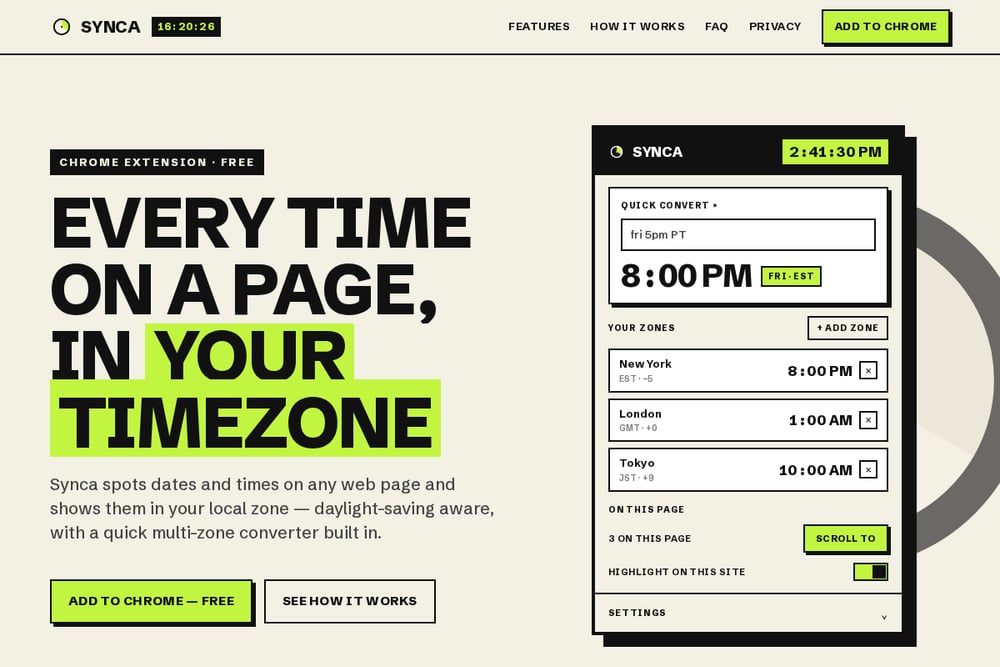 A screenshot of the Synca website.
Synca is a free Chrome extension that automatically detects dates and times on any web page and converts them to your local timezone. It's like having a personal timezone translator that works in the background. You can hover over a time to see a full breakdown across your saved zones, or use the quick convert feature to paste something like 'fri 5pm PT' and get instant results. It's daylight-saving aware, so you'll never miss a meeting because of a clock change. Plus, it's private by design—everything runs locally, with no accounts, no servers, and no tracking. If you're tired of manually converting times while browsing, Synca is a must-try.
#3 OneCal Time Zone Converter Extension
 A screenshot of the OneCal Time Zone Converter Extension website.
OneCal's Time Zone Converter Extension is designed to keep you in your workflow without context switching. It offers a world clock and time zone converter right inside your browser, so you can quickly see what time it is in multiple cities. The interface is intuitive—just search for a city and add it to your list, and you'll see the current time at a glance. It's a great tool for planning meetings or coordinating with international teams. However, it doesn't automatically detect times on web pages, so you'll need to use the popup for conversions. If you're already using OneCal for scheduling, this extension is a natural addition.
#4 timezone-converter
 A screenshot of the timezone-converter GitHub repository.
timezone-converter is an open-source Chrome extension hosted on GitHub, which means you can inspect the code and even contribute to its development. It's a straightforward tool that converts date times on a page to a given new timezone. This is a great option for developers who want a customizable solution or who prefer open-source software. The extension is lightweight and does exactly what it says, but it may lack some of the polish of commercial alternatives. You'll need to be comfortable with a more basic interface. If you're a developer looking for a simple, hackable timezone converter, this is worth checking out.
#5 Change Timezone (Time Shift)
Change Timezone (Time Shift) is a Chrome extension that lets you change your browser's timezone to any location in the world. This is useful for testing websites that display time-sensitive content or for accessing region-locked features. It's a different approach than the other tools—instead of converting times, it actually shifts your browser's clock. This can be handy for developers and QA testers who need to simulate different timezones. However, it's not designed for everyday time zone conversions. If you're a developer or tester, this tool is a niche but valuable addition to your toolkit.
How to Choose the Right Time Zone Tool
First, think about how you work. If you're constantly reading articles or documents with times in different zones, you need a tool that automatically detects and converts them, like Synca. If you prefer a manual converter for quick lookups, Savvy Time or OneCal are solid choices. Consider whether you need multi-zone support—if you regularly coordinate with teams in New York, London, and Tokyo, a tool with a roster of zones is essential. Privacy is another factor; if you're concerned about data collection, look for tools that process everything locally. Finally, think about your budget—all the tools here are free, but some may offer premium features. Choose the one that fits your workflow and gives you the least friction.
Automating Time Zone Conversions
The real power of these tools comes from automation. With Synca, you can set up your preferred zones once, and it will automatically convert times on any page you visit. You can also use the quick convert feature to paste a time and get instant results across all your zones. For a more manual approach, Savvy Time and OneCal let you save your favorite cities for one-click access. The key is to set up your zones once and let the tool do the heavy lifting. This way, you never have to think about time zones again—just hover, click, or paste, and you're done.
The Bottom Line
Time zone confusion is a productivity killer, but these five tools offer a cure. Whether you need automatic on-page conversion, a simple popup converter, or a developer-friendly solution, there's something here for you. Synca stands out for its automatic detection and privacy-first approach, making it a top pick for everyday browsing. Savvy Time and OneCal are reliable for manual conversions, while timezone-converter and Change Timezone cater to more technical needs. Try a couple and see which one fits your workflow best. Your future self will thank you when you never miss another meeting time again.