A load that looks good on the rate sheet can still cost you money once fuel, fixed costs, and your own paycheck come out of it. These five calculators help you run that math before you call the broker back.
The math behind every load
Owner-operators live and die by per-mile math, and the tools that do that math have split into two camps. Load boards bundle profit calculators into subscription products, while independent sites offer free, no-sign-up checks. The difference matters: a calculator that only subtracts fuel and tolls can tell you a load is profitable while quietly ignoring your truck payment, insurance, and the wage you owe yourself. The tools below range from full cost-per-mile models to quick trip-cost estimates, so you can pick the depth you actually need.
How these tools were compared
Each calculator was weighed on cost-per-mile depth (does it include fixed costs and owner pay, or just trip expenses?), pricing and access (free, sign-up, or subscription-gated), offline and mobile usability, and how clearly it explains its own math. Extra credit went to tools that add record-keeping features beyond the calculator itself.
Here is the short version before the details: two of these tools are free and standalone, two live inside load board subscriptions, and one is built for carriers who want a yearly view rather than a single load.
| Provider | Best For |
|---|---|
| TruckLoads Profit Calculator | Drivers already using the Trucker Path load board |
| Wheelsum: does this load pay? | Owner-operators who want a free, offline load check with their own pay built in |
| Direct Freight Profit Calculator | Subscribers who want lane-level rate context |
| Beyond Transport Load Profitability Calculator | Carriers who want a full expense breakdown per load |
| Sky Transport Solutions Profit and Cost per Mile Calculator | Owner-operators setting a yearly income target |
The five calculators in detail
#1 TruckLoads Profit Calculator
 A screenshot of the TruckLoads Profit Calculator website.
Trucker Path's TruckLoads calculator walks you through load profit step by step: revenue, fuel cost, tolls, dispatch fees, and profit per mile. It is upfront that these are trip costs only, and it tells you to compare the result against your own fixed cost per mile. The tool also explains the difference between rate per mile and profit per mile, and why deadhead miles drag down a load's real value. If you already run on the Trucker Path load board, it fits neatly into your existing workflow. The tradeoff is that insurance, truck payments, and maintenance stay outside the calculation.
#2 Wheelsum: does this load pay?
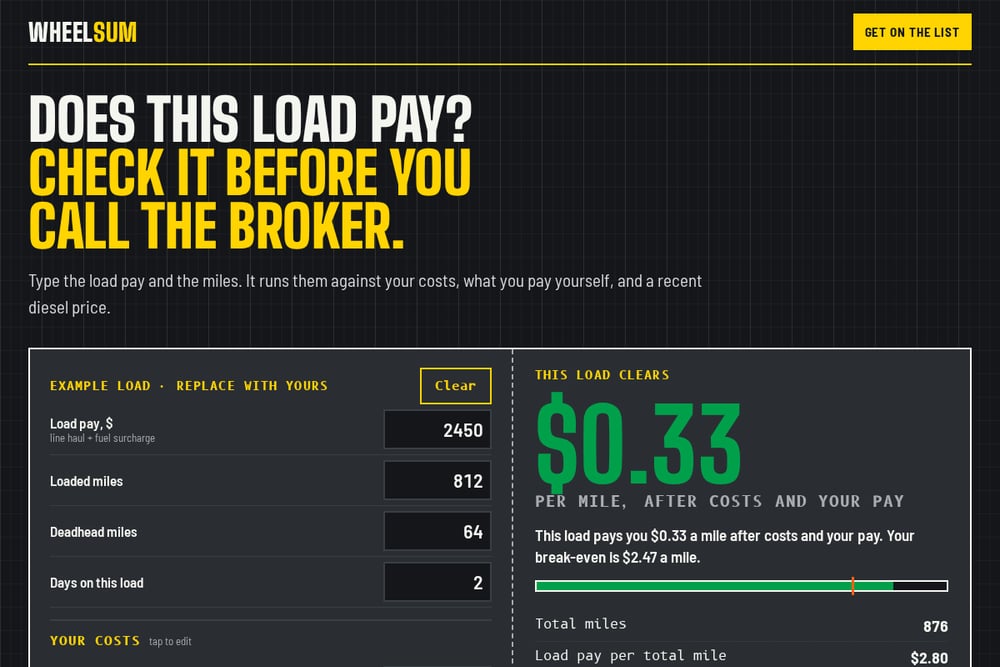 A screenshot of the Wheelsum: does this load pay? website.
Wheelsum asks one question, does this load pay, and answers it with your numbers rather than generic averages. You type the load pay, loaded and deadhead miles, and days on the load, then enter your own costs: truck payment, insurance, repairs and tires, and what you pay yourself. It pulls a recent EIA weekly diesel average (the week of Nov 16, 2026, in the example) and shows what the load clears per mile and per day, plus what happens if diesel jumps 50 cents. The example load clears $0.33 a mile after costs and owner pay against a $2.47 break-even. It is free, needs no sign-up, and runs offline once the page is open, with nothing you type sent anywhere. It also includes a printable IFTA trip sheet for drivers without GPS or ELD.
#3 Direct Freight Profit Calculator
 A screenshot of the Direct Freight Profit Calculator website.
Direct Freight's profit calculator works lane by lane: pick an origin and destination, and it builds a profit report using current fuel prices and historical load rate data. The depth is real, with more than 50,000 lanes of freight data behind it. The catch is access. You get a limited view unless you log in or upgrade, and full lane data comes with a load board subscription. For drivers already paying for Direct Freight, it is a useful sanity check before booking. For everyone else, it is a preview of a paid product.
#4 Beyond Transport Load Profitability Calculator
 A screenshot of the Beyond Transport Load Profitability Calculator website.
Beyond Transport's free calculator goes further than most trip-cost tools. You enter revenue, loaded and deadhead miles, fuel price and MPG, driver pay, broker fees, tolls, and other expenses, and it returns net profit, margin, revenue per mile, and cost per mile. The results break down each expense line so you can see exactly where the money went. It is clearly built as a lead-in to the company's TMS, which tracks profitability on every load automatically. As a standalone free tool, though, it holds up well for a single-load gut check.
#5 Sky Transport Solutions Profit and Cost per Mile Calculator
 A screenshot of the Sky Transport Solutions Profit and Cost per Mile Calculator website.
Sky Transport Solutions takes the long view. Instead of one load, you enter weekly paid miles, empty-mile share, weeks worked per year, and your monthly bills, and it shows what a year of running actually leaves you. It returns your cost per mile across all miles, your break-even rate per loaded mile, and the rate you need to hit your income goal. Repairs and tires start at 2025 ATRI industry averages, and the boxes update as you type with no sign-up. If you have ever wondered what rate you truly need rather than what rate sounds good, this is the tool for that question.
Pick the calculator that matches your question
Start with what you are actually trying to decide. If a broker is on the phone and you need a yes or no in two minutes, use a free single-load tool that includes your fixed costs and your own pay, like Wheelsum. If you are planning a year, setting an income goal, or renegotiating your rate floor, a cost-per-mile model like Sky Transport Solutions answers a bigger question. If you already pay for a load board, check whether its built-in calculator includes fixed costs before you trust its profit number. And whatever you use, enter your real numbers, not the sample ones. A calculator is only as honest as the costs you feed it.
Where automation fits
The repetitive part of this work is not the math, it is the record-keeping around it. A simple workflow: run every load through a calculator before you commit, save the result with the rate confirmation, and log the trip details as you go. Wheelsum's printable IFTA trip sheet handles the state-line and odometer tracking for drivers without ELD, and you keep it with your fuel receipts for four years. At quarter end, the numbers are already there instead of reconstructed from memory. That is the whole automation story here: capture the data at the moment it happens, and the filing becomes a printout rather than a project.
The bottom line
None of these tools will find you better loads, but they will stop you from taking bad ones. The free standalone calculators, Wheelsum and Beyond Transport, give you the most control over your own cost inputs without a subscription. The load board tools are convenient if you already pay for them, and Sky Transport Solutions is the one to reach for when you need a yearly number rather than a per-load one. Pick one, put your real costs in it, and check the next load before you call the broker back.